Introduction
QR Scanner & Barcode Reader is a lightweight utility that brings reliable QR code and barcode scanning, creation and management into a single app. Designed for speed and clarity, QR Scanner & Barcode Reader opens links, reads product and ticket codes, extracts contact details and can connect you to WiFi networks without unnecessary steps. The app supports commonly used 2D and 1D formats so you can handle everything from shopping barcodes to event QR codes with one tool.
Key features
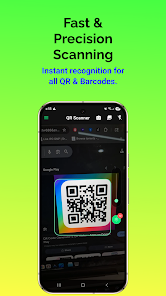
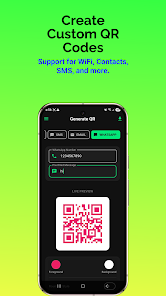
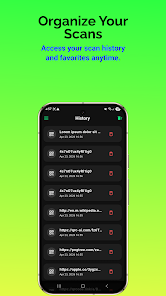
The core functionality of QR Scanner & Barcode Reader includes fast real-time scanning using your device camera and the ability to scan images saved in your gallery. It recognizes QR codes and many 1D barcode standards such as EAN-13, Code 128 and Code 39. A built-in generator creates scannable codes for URLs, WiFi credentials, plain text and email, and it can produce simple professional-grade 1D barcodes for labeling or sharing. Scan history is stored locally so you can revisit previous results, and the app offers flashlight support for low-light conditions as well as a privacy-forward approach that minimizes data sharing.
How it works
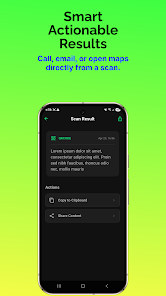
Scanning is automatic: point your camera at a printed or digital code and results appear instantly. If the automatic check is inconclusive the interface provides clear cues and a single-tap option to retry or to manually select an image from the gallery for analysis. When a QR code contains a link the app presents the URL with safe preview options before opening it in a browser; when a code contains WiFi credentials you receive a prompt to connect; contact data can be reviewed and saved to your address book. The app also includes easy one-tap copying of decoded text to the clipboard and simple sharing through your device’s native share panel.
Controls and customization
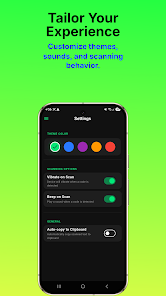
QR Scanner & Barcode Reader keeps controls minimal to reduce friction: a central scanning view, an accessible shortcut to switch to gallery mode, and a generator screen where you select the code type, enter the content and preview the result. The generator provides format choices and a clear preview so you can verify correct encoding before saving or exporting. Common actions—save, share, delete—are presented with clear icons and short labels to make the workflow intuitive for new users and efficient for repeat use.
User experience and accessibility
The app focuses on a clean interface that favors large tap targets and readable text, helping users of all ages navigate quickly. Flashlight control is integrated directly into the scanning view to reduce extra taps, and camera permission prompts explain why access is needed and how it is used. QR Scanner & Barcode Reader is suitable for occasional users and people who rely on quick scanning throughout the day: shoppers verifying prices, event staff scanning tickets, or anyone exchanging contact information via QR codes.
Offline use and privacy
Many basic functions work without an internet connection — scanning codes, reading text and generating new codes all operate locally on the device. Saved scan history remains on your phone unless you choose to export or share it. The app minimizes background network activity and makes permission requests explicit, allowing you to control when and how camera or storage access is granted.
Practical uses and replay value
Because it combines scanning, generation and local history, QR Scanner & Barcode Reader is useful beyond a single task: create a QR for a meeting agenda, save a WiFi code for visiting guests, or generate a barcode for a printed label. The convenience of quick scans and saved results encourages repeated everyday use, while the generator and gallery scan features add flexibility for users who work with both digital and printed materials.
Limitations
Some advanced business features are outside the scope of this compact tool: there is no full inventory management or integrated point-of-sale system, and batch scanning with bulk export is not presented as a central capability. The app does require camera access to scan in real time, so device permissions need to be enabled for that functionality. These limitations allow the app to remain lightweight and focused on fast, accurate code handling rather than extensive enterprise features.
- No virus
- No advertising
- User protection
Information
- File size: 31.00 M
- Language: English
- Latest Version: 1.11.0
- Requirements: Android
- Votes: 185
- Package ID: com.coreappslab.qrcodereader
- Developer: Core Apps Lab
Screenshots
-
1
WhatsApp Business Mod
Download -
2

ChatOn – AI Chat Bot Assistant Mod
Download -
3
4English - Learn English Daily Mod
Download -
4

Any.do - To do list & Calendar Mod
Download -
5

Habitify: Daily Habit Tracker Mod
Download -
6

ANDI - Ai Search Engine
Download -
7

GitMind: AI Mind Map, Chatbot
Download -
8

ELSA AI Learn & Speak English
Download







Explore More
Discover and download the latest system software of 2024 at high speed for free. Explore multidimensional rankings and references to help you choose the best system software. Rest assured, all software has undergone rigorous security checks and virus scans for your safety.

Chinese cooking recipes game

Time Sphere

Parallel

AirConsole

PicklePlay

Moonlight

Monitora View

Agrotti