Introduction
Quick Percent Calculator is a compact, no-nonsense utility designed to make percent math fast and painless for everyday tasks. Quick Percent Calculator puts common percentage operations within two taps: calculate percent change between values, apply a percent to a number to add or subtract amounts for discounts, taxes or markups, and view both the absolute difference and the multiplier at once so you can act quickly and confidently in stores, at work or while budgeting. The app is intentionally lightweight and focused, so the core tools are available immediately without extra menus or distracting options.
Key features and modes
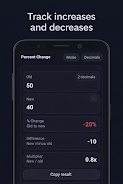
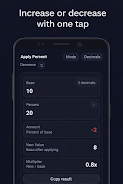
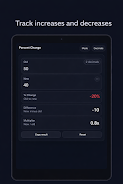
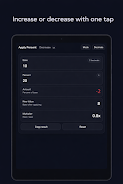
The app offers three primary modes that cover most practical percent work: percent change (compare two values to see increase or decrease), apply percent (add or subtract a percent to a base value for discounts, tax and markups), and ratio/multiplier display (show the numeric multiplier alongside the percentage so you understand relative change). Quick Percent Calculator includes decimal precision control so you can choose how many decimal places to show, one-tap copy for fast sharing of results into messages or notes, and a dark, distraction-free theme that keeps attention on numbers. The interface also highlights whether a result is an increase or a decrease so the outcome is immediately readable at a glance.
How it works and example calculations
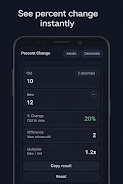
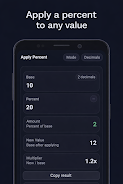
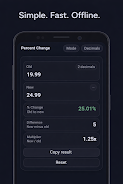
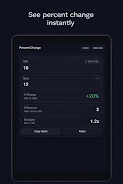
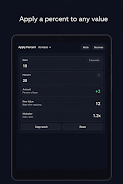
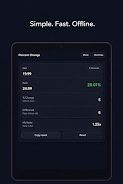
Behind the simple UI are straightforward formulas presented in a way that anyone can follow. For percent change, Quick Percent Calculator computes the difference between two values, divides by the original value, and displays the percentage change together with the absolute difference and the multiplier (for example, a price going from 80 to 100 shows a 25 percent increase and a multiplier of 1.25). When applying a percent, the app calculates the adjusted total and shows both the added or subtracted amount and the final result, which is useful for quickly checking sale prices, taxes or tip amounts. Examples are shown inline so you can verify how the number was derived before copying or using it elsewhere.
Controls, layout and accessibility
The controls are built for speed: large numeric fields accept typed input from the soft keyboard, and each mode is selectable with a clearly labeled tab at the top. Numeric entry supports paste and selection, and results can be copied with a single tap for immediate use in a checkout or spreadsheet. The design favors legible typography, high contrast for readability, and controls sized for easy tapping, which helps users who prefer larger targets or who use the app with a single hand. Quick Percent Calculator is also mindful of accessibility: labels are kept descriptive so screen readers can announce key fields, and color choices are tested for sufficient contrast in the dark theme.
User experience, progression and replay value
Although this is a utility rather than a game, Quick Percent Calculator is designed to improve everyday efficiency: frequent use builds confidence in quick mental checks, and the predictable layout reduces friction so repetitive tasks become faster over time. The app keeps recent results locally for reference during a session, so you can review a few past calculations while working through a set of prices or budget items. Its simplicity encourages repeated use for shopping, payroll checks, invoices or schoolwork without the overhead of larger finance apps.
Offline operation, privacy and performance
Quick Percent Calculator works completely offline and does not require an account, so all calculations remain on your device. There is no data collection tied to personal accounts and no synchronization to the cloud; if you prefer backups or cloud history, be aware that the app deliberately avoids those services to keep your information private. The code is optimized for low resource usage, which means fast launch times and smooth input even on older phones and small tablets.
Limitations and recommended uses
Quick Percent Calculator focuses exclusively on percent-related calculations and is not intended to replace full-featured spreadsheet software or accounting systems. It does not offer cloud backups, collaborative editing or advanced financial forecasting. It does, however, excel at quick, accurate percentage checks: discount verification, tip and tax calculations, simple budget comparisons, and school assignments involving percent problems. If your workflow needs integrated reporting, multi-user sync or deep accounting features, use a dedicated finance app alongside Quick Percent Calculator for those tasks.
- No virus
- No advertising
- User protection
Information
- File size: 17.83 M
- Language: English
- Latest Version: 4.0
- Requirements: Android
- Votes: 361
- Package ID: com.yusun.quickpercentcalculator
- Developer: YuSun Lim
Screenshots
-
1

Vlog Video Editor Maker: VlogU Mod
Download -
2

SnapTube – YouTube Downloader HD Video Mod
Download -
3

SuperVPN Fast VPN Client Mod
Download -
4

Thunder VPN – Fast, Safe VPN Mod
Download -
5

Secure VPN-Safer Internet Mod
Download -
6

ApkShare Mod
Download -
7

SOSO – Super Fast VPN Mod
Download -
8

LinkVPN Unlimited VPN Proxy Mod
Download








Explore More
Discover and download the latest system software of 2024 at high speed for free. Explore multidimensional rankings and references to help you choose the best system software. Rest assured, all software has undergone rigorous security checks and virus scans for your safety.
View more