Introduction
Viz Player is a lightweight, versatile media player that brings local video files and streaming URLs together in a single, uncluttered interface. It supports common streaming protocols and file containers such as HLS (M3U8), DASH, RTSP and MP4, and provides practical playback options like picture-in-picture, TV casting and the ability to save supported files for offline viewing. The app is built for users who want a straightforward tool to play personal recordings, verify stream URLs or maintain a small on-device media library without dealing with complicated menus.
Key features
The feature set is focused and functional: support for adaptive streaming protocols and conventional file formats, selectable audio and video tracks where those are present in the source, and an interface that favors direct access to the media you add. Picture-in-picture mode keeps video visible while you switch to other apps, and casting support lets you transfer playback to a compatible TV or casting device. Offline saving creates a local copy of supported streams and files so you can watch without a network connection, and a simple favorite marker helps you find frequently watched items quickly. Full-screen landscape viewing and a dark theme reduce distraction during longer sessions while keeping the display easy on the eyes.
User controls and playback behaviour
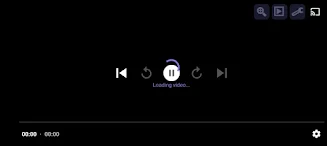
Playback controls are intentionally familiar and minimal to reduce the learning curve: a clear play/pause control, a seek bar for quick navigation inside files and streams, and options to select between available audio and video tracks. Quality selection is presented when multiple stream variants exist, so you can choose a lower bitrate on constrained connections or a higher quality stream when bandwidth allows. Picture-in-picture and casting include straightforward on-screen controls to start, pause and stop playback without needing to return to the main player. These controls are designed to work well both on phones and on larger displays when casting.
Library organization and content management
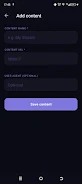
Viz Player lets you add individual video files and streaming URLs into a single library view where they can be organized and annotated. You can mark favorites for quick access and keep different items separated into simple collections for easier browsing. Downloaded items that are saved for offline playback are kept in the app’s library so you can review and remove them as needed, helping control local storage. The application does not index or provide media automatically; everything in your library is added by you, which keeps the app focused on playback and management rather than content discovery.
Performance, compatibility and device support
The design prioritizes responsiveness and a small footprint so the interface stays snappy on a wide range of devices. Support for adaptive streaming formats like HLS and DASH improves compatibility with many public and private stream sources, while RTSP and MP4 playback cover conventional camera feeds and saved video files. Because the player concentrates on client-side decoding and standard stream handling, it will not work with streams protected by proprietary DRM systems or services that intentionally block external players. If you need a simple, capable player to test streams or play local files, Viz Player is tuned for that role.
Accessibility, customization and reliability
Accessibility considerations are reflected in the app’s dark theme, large-touch targets for primary playback controls and a clear layout that reduces visual noise. Basic customization focuses on viewing preferences: landscape fullscreen, compact lists or the dark interface for low-light use. Offline playback and local file management boost reliability when connectivity is intermittent, and the app keeps user control over what is stored and removed so device storage remains transparent and manageable.
Privacy, rights and limitations
Viz Player does not host, stream or supply any media content itself. Users are responsible for adding files or entering stream URLs and for ensuring they have the legal right to play that content. The player does not bypass encryption or access controls on protected streams, and playback of certain restricted streaming services may not be available. If you require compatibility with DRM-protected platforms, those limitations should be considered before choosing this app.
Overall, Viz Player aims to be a dependable, no-nonsense media player that combines core playback features with simple library tools and offline capabilities, making it useful for testing stream URLs, watching personal recordings and keeping a compact media collection on your device.
- No virus
- No advertising
- User protection
Information
- File size: 9.27 M
- Language: English
- Latest Version: 4.0
- Requirements: Android
- Votes: 477
- Package ID: com.playerviz.app
- Developer: Nina deva
Screenshots



-
1
WhatsApp Business Mod
Download -
2

ChatOn – AI Chat Bot Assistant Mod
Download -
3
4English - Learn English Daily Mod
Download -
4

Any.do - To do list & Calendar Mod
Download -
5

Habitify: Daily Habit Tracker Mod
Download -
6

ANDI - Ai Search Engine
Download -
7

GitMind: AI Mind Map, Chatbot
Download -
8

ELSA AI Learn & Speak English
Download







Explore More
Discover and download the latest system software of 2024 at high speed for free. Explore multidimensional rankings and references to help you choose the best system software. Rest assured, all software has undergone rigorous security checks and virus scans for your safety.

Chinese cooking recipes game

Time Sphere

Parallel

AirConsole

PicklePlay

Moonlight

Monitora View

Agrotti