
Introduction
VyMerge is a compact, privacy-focused PDF and image merging utility that runs entirely on your Android device. VyMerge combines PDFs, JPGs and PNGs into a single PDF without uploading files to a server, requiring an account, or imposing hidden limits; because VyMerge processes everything locally you can assemble reports, scanned photos and multi-page documents quickly and offline while keeping your data on the device.
Key features
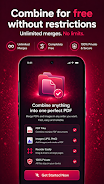
The app centers on a straightforward merging workflow: select multiple files from your device storage, preview thumbnails, reorder pages with simple gestures and export a clean PDF ready to share. VyMerge accepts existing PDF files and common image formats (JPG, PNG) and converts images into PDF pages automatically. You can preview each page before exporting, enable optional page numbering for printed reports, and save or share the resulting PDF directly from the device using Android’s native share sheet. There are no account sign-ins, no upload queues, and no arbitrary limits on the number of merges.
How it works — controls and workflow
VyMerge keeps controls minimal to reduce friction: tap to select files, use multi-select in your file browser to add batches, long-press and drag to reorder pages, and tap a thumbnail to open a page preview. In preview mode you can zoom to check image clarity, swipe between pages and remove or replace individual pages before export. The export dialog offers basic choices so you can create a PDF in a single sequence of steps: assemble, review, export. The user flow is designed so that a typical merge—select, arrange, export—takes only a few taps and requires no prior training.
Progression, customization and organization
While VyMerge focuses on one task, it supports ways to streamline repeated use. Users develop efficient patterns: keeping folders of scans or images ready to import, naming exports consistently for classes or clients, and using the in-app preview to verify order before finalizing. Customization is intentionally limited to avoid complexity: choose whether to include page numbers and decide the output filename and destination. The app emphasizes clear document structure by giving you precise control over page order and the ability to remove unwanted pages immediately before creating the final PDF.
Visual style and level of polish
The interface uses a clean, uncluttered layout with thumbnail-based pages so you can visually inspect the merged result. Action buttons and labels are placed for one-handed use on phones and laid out simply on tablets. Contrast, spacing and iconography are chosen to reduce visual noise and let you focus on arranging pages instead of hunting through menus. Because VyMerge is single-purpose, performance tuning prioritizes fast file handling and predictable, repeatable behavior rather than a large feature set.
Replay value and typical use cases
VyMerge delivers long-term value by handling recurring tasks: preparing class assignments, compiling receipts into a single file, assembling multi-page scans, or combining separate PDFs into a single submission. The app’s replay value comes from speed and reliability—once you establish a workflow, repeated merges are fast and familiar. It is useful for students, professionals, freelancers and anyone who regularly consolidates images and documents on the go.
Accessibility, device compatibility and offline use
VyMerge is built to work without an internet connection so it remains useful in low-connectivity scenarios and protects privacy by avoiding cloud transfers. The design favors readable labels and large touch targets to improve usability for a broad range of users, and it is compatible with common Android accessibility services so assistive technologies can operate alongside the app. Because processing is local, performance will depend on device capabilities, but VyMerge aims to minimize memory usage and provide progress feedback during longer merges.
Limitations and scope
VyMerge is intentionally focused on merging and does not replace full-featured PDF editors: it does not perform OCR, form filling, annotations, cloud syncing or advanced page-level editing. If you need to edit text inside PDFs, recognize scanned text, or synchronize documents to cloud storage, a dedicated editor or cloud service will be required. For straightforward, secure, offline merging of PDFs and images into a single shareable PDF, VyMerge remains a lightweight and dependable choice.
- No virus
- No advertising
- User protection
Information
- File size: 61.92 M
- Language: English
- Latest Version: 1.0.0
- Requirements: Android
- Votes: 392
- Package ID: com.vyntalabs.vymerge
- Developer: Vynta Lab Studio
Screenshots






-
1

WhatsApp Business Mod
Download -
2

ChatOn – AI Chat Bot Assistant Mod
Download -
3

4English - Learn English Daily Mod
Download -
4

Any.do - To do list & Calendar Mod
Download -
5

Habitify: Daily Habit Tracker Mod
Download -
6

ANDI - Ai Search Engine
Download -
7

GitMind: AI Mind Map, Chatbot
Download -
8

ELSA AI Learn & Speak English
Download






Explore More
We provide a wide range of commonly used software for free and secure download. All software has undergone thorough security and virus scans to ensure a safe download experience.

Real Beauty Loyalty

Chinese cooking recipes game

Tierbuch Hühner
CookingTimerPro

FinSwift

LibLib

Soonly: Ideas & Notes

Tout va bien - Daily Check-in




























