Introduction
Service Bus Dojo is a focused cross-platform client for inspecting and managing Azure Service Bus resources, built to make queue and topic debugging practical for corporate developers and operations engineers. The app pairs a compact, discoverable interface with a Rust-powered core so common investigation tasks — peeking at payloads, replaying messages, and running targeted tests — stay fast and responsive even when you are working across many namespaces and large message sets. Service Bus Dojo emphasizes clear controls and repeatable workflows to reduce context switching between portals and ad-hoc scripts.
Key features and capabilities
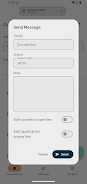
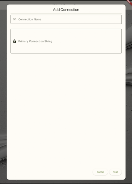
The client supports adding multiple Service Bus namespaces and saving connection presets for development and QA, including working with free-tier connections where applicable. Messages can be inspected non-destructively so you can read headers, properties, and body content without dequeuing, and individual or batched messages can be forwarded, resubmitted, or deleted when appropriate. Batch send lets you compose and transmit multiple messages in a single operation for scenario testing, and the send dialog includes templates and saved payloads so you can quickly rerun a test case. Secure connection handling and credential storage are designed for development workflows and minimize repeated reconfiguration.
Controls, interaction mechanics, and message handling
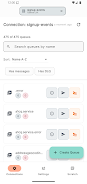
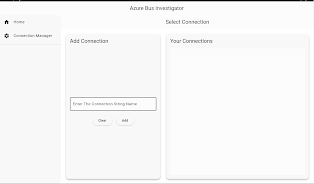
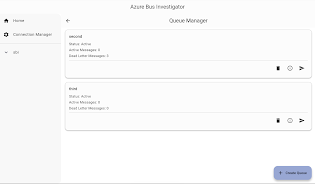
The interface centers on a single toolbar for connection setup and workspace switching, with contextual controls on message lists for common actions. Column sorting and customization let you surface the metadata you care about, while inline message viewers expose decoded payloads and metadata with one click. Keyboard shortcuts accelerate repeated operations such as peek, receive-and-abandon, forward, and resubmit, and the send dialog supports placeholders and saved templates so composing test traffic becomes a repeatable, low-friction task. Filtering and search let you narrow by label, sequence number, or custom properties to reproduce specific processing conditions reliably.
Progression and learning curve
Teams typically progress from quick inspections to composition and validation: new users start by connecting a development namespace and exploring queues and subscriptions, then move on to composing targeted test messages and validating consumer behavior. The included 7-day trial supports a complete evaluation flow that demonstrates how saved searches, templates, and connection presets reduce daily overhead. Inline documentation and contextual hints help bridge the learning gap for operators unfamiliar with messaging concepts, while more experienced users can adopt keyboard-driven workflows and batch operations to accelerate investigation cycles.
Visual style, level structure, and customization
The visual design prioritizes information density and readability: compact list views present queues and subscriptions with adjustable columns, message viewers use monospace rendering for payloads when helpful, and color contrast is tuned for both light and dark themes. Workspaces function like levels, grouping related namespaces, queues, and subscriptions for focused investigation across a single project or incident. Customization options include column selection, message viewer preferences, configurable keyboard shortcuts, and saved workspace layouts so you can tailor the interface to the scope of your debugging session.
Replay value, exported workflows, and reproducibility
Replay and reproducibility are central to the tool’s value: export and import of message batches, saved templates, and repeatable send configurations let teams reconstruct scenarios reliably for post-mortem analysis or peer review. You can export messages to share them offline or import saved batches to validate handling under different consumer conditions. These features make the app useful beyond one-off inspections and support ongoing investigation playbooks used by engineering and ops teams.
Accessibility, offline handling, and platform support
Accessibility considerations include full keyboard navigation across message lists, high-contrast modes, and clear focus indicators to improve compatibility with assistive technologies. The client also supports working with exported message sets when network access is limited, allowing you to review payloads, metadata, and saved searches offline and prepare test batches for later replay. While most operations require a live connection to an Azure Service Bus namespace, offline inspection and import/export functions provide practical options for constrained environments and post-incident diagnostics.
Limitations and appropriate use cases
Service Bus Dojo is designed for development and troubleshooting workflows rather than high-throughput production management. The free-tier connection support and the 7-day evaluation period are intended for testing and adoption rather than continuous production scaling. Teams that require integrated load testing or clustered production management should treat this tool as a complement to their operational platform: it fills the inspection and rapid-debugging niche without replacing full enterprise management systems. Users should also allow for a modest learning curve when using advanced features such as forwarding and resubmission and take appropriate precautions when performing destructive operations on live namespaces.
- No virus
- No advertising
- User protection
Information
- File size: 65.29 M
- Language: English
- Latest Version: 2.9.3
- Requirements: Android
- Votes: 312
- Package ID: com.AhyaanTech.AzureServiceBusInvestigator
- Developer: AhyaanTech
Screenshots


-
1

Vlog Video Editor Maker: VlogU Mod
Download -
2

SnapTube – YouTube Downloader HD Video Mod
Download -
3

SuperVPN Fast VPN Client Mod
Download -
4

Thunder VPN – Fast, Safe VPN Mod
Download -
5

Secure VPN-Safer Internet Mod
Download -
6

ApkShare Mod
Download -
7

SOSO – Super Fast VPN Mod
Download -
8

LinkVPN Unlimited VPN Proxy Mod
Download








Explore More
Discover and download the latest system software of 2024 at high speed for free. Explore multidimensional rankings and references to help you choose the best system software. Rest assured, all software has undergone rigorous security checks and virus scans for your safety.
View more