Introduction
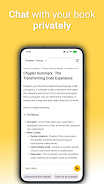
Liboo AI is an on-device learning assistant that lets you interact directly with your documents to extract clear summaries, pose natural-language questions, and receive context-aware answers without leaving your phone or tablet. Designed for students, researchers and professionals who work with notes, articles and PDFs, Liboo AI converts static files into a navigable, searchable study resource while keeping all processing local for stronger privacy. The app emphasizes fast, uncomplicated interactions so you can reduce long texts to concise takeaways or drill down with follow-up queries in a few taps.
Key Features
The feature set centers on reliable, offline document understanding: Liboo AI produces concise summaries tailored to the length you need, answers specific questions about the text, and indexes content so you can search keywords across a file. Highlights and inline excerpts can be focused on to generate targeted answers, and the app supports common document formats like PDFs and plain text notes. Summaries are adjustable in scope — brief bullet-style overviews for quick review or paragraph-length recaps for deeper study — and the system preserves the original document structure so headings and sections remain easy to navigate.
Controls and Interaction
Interaction follows familiar mobile patterns to keep the learning flow intuitive. A single tap selects passages, a long press highlights text for deeper inspection, and a built-in search bar locates terms across the document. Swipe gestures move between sections and a compact control panel lets you refine summary length and set the level of detail for answers. For keyboard users, simple shortcuts are supported when an external keyboard is attached, and the interface minimizes steps so follow-up questions can be typed or pasted without losing context.
Progress, Organization and Workflow
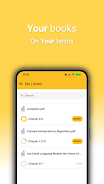
To support extended study sessions, the app provides persistent bookmarks and a local interaction history that lets you return to points of interest and review previous summaries and answers. You can pin important passages for later, resume reading at the last position, and build a personal workflow by iterating on summaries with clarifying follow-up questions. This approach helps turn a single document into a progressive study resource: start with a quick overview, then refine based on what you need to understand more deeply.
Visual Style and Customization
The visual design favors readability and low distraction: clear typography, adjustable font sizes, and a choice of light and dark themes make long reading sessions more comfortable. Layout options include a compact mode for condensed review and an expanded mode for side-by-side viewing of source text and generated summary. You can adjust the amount of contextual text shown around answers, and color-coded highlights help mark concepts, definitions or questions as you study.
Accessibility and Local Operation
Because Liboo AI runs entirely on-device, it supports offline use cases where network access is limited or privacy is a priority. The app is optimized for accessible reading with scalable text and contrast options, and simple navigation suited to assistive tools. Local processing means your documents never need to be uploaded to a cloud service, and all indexing, summarization and question answering stay on your device under your control.
Performance Notes and Limitations
Offline capability brings clear benefits and a few trade-offs: intensive processing is limited by your device's CPU and memory, so very large documents can take longer to analyze and may require patience on older hardware. Liboo AI cannot fetch live web content or deliver real-time updates from external sources while offline, and results reflect only the information contained in the imported files. For the best experience, keep documents organized into manageable sections and use the adjustable summary settings to balance depth and speed.
Who This App Is For
Liboo AI is well suited to students preparing for exams, professionals reviewing technical reports, and anyone who needs to extract ideas quickly from dense material. It helps reduce time spent skimming and makes follow-up study more targeted by turning static texts into interactive resources that adapt to how you read and question information. The local-first design keeps sensitive work on your device and supports uninterrupted study when connections are unreliable.
- No virus
- No advertising
- User protection
Information
- File size: 38.00 M
- Language: English
- Latest Version: 0.0.2
- Requirements: Android
- Votes: 298
- Package ID: io.github.lemcoder.studybuddy
- Developer: lemanski
Screenshots

-
1
WhatsApp Business Mod
Download -
2

ChatOn – AI Chat Bot Assistant Mod
Download -
3

4English - Learn English Daily Mod
Download -
4

Any.do - To do list & Calendar Mod
Download -
5

Habitify: Daily Habit Tracker Mod
Download -
6

ANDI - Ai Search Engine
Download -
7

GitMind: AI Mind Map, Chatbot
Download -
8

ELSA AI Learn & Speak English
Download







Explore More
Today, I'm recommending a collection of learning apps. These apps are designed specifically for users to study on their mobile devices. Regardless of the subject, these apps provide detailed materials for reading and offer a variety of learning resources and practice questions. Additionally, users can engage in learning activities alongside numerous teachers within the app. Users in need are encouraged to download these apps.
View more