Introduction
SV File Manager is a versatile Android utility that puts fast, secure control of files and folders into a clean Material Design interface. SV File Manager helps you browse internal storage, perform everyday file operations like create, move, rename and delete, and locate content instantly with a built-in search. Designed to be lightweight and adaptable, the app combines simple daily tools and more advanced capabilities—such as APK handling, AES-256 encryption for private files, ZIP archiving and integrated media viewers—so both casual and power users can stay productive on-device.
Key features
SV File Manager organizes core file tasks into a single app with smooth navigation and responsive performance. You can browse internal storage with sortable lists and a card view, use instant search to find files by name or extension, and recover recently deleted items from a Safe Trash bin. For media, the app includes a music player with album art, metadata support and background playback, and a video player built on ExoPlayer that supports MP4, MKV and WebM with full-screen mode and swipe seeking. The image viewer supports pinch-to-zoom and quick set-as-wallpaper actions, and PDFs can be viewed or converted to PNG in one tap. Power features include ZIP creation and extraction plus APK installation and backup; strong privacy is available via AES-256 encryption for files marked as private.
Controls and navigation
The interface focuses on intuitive gestures and familiar Android controls. Long-press selection and multi-select make bulk moves, shares or deletions quick, while drag-and-drop and context menus let you rearrange folders and files without digging through nested options. A persistent search bar refines results as you type, and sorting options let you view items by name, date or size. Media controls match common expectations: swipe gestures for video seeking, background playback for audio, and pinch gestures for images. These interaction choices reduce friction so routine tasks take fewer taps.
Customization and visual style
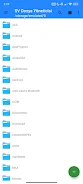
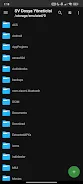
Material Design principles guide SV File Manager’s visual presentation, with light and dark themes, multiple accent colors and swappable folder icons to match personal preferences. The app aims to stay visually uncluttered: density and view modes let you choose between a compact list for fast scanning or a card-style layout that surfaces previews. Because it is built to be lightweight, the app minimizes bloat and avoids intrusive advertising so the interface remains focused on file productivity.
User experience and progression
Beginners will find basic file browsing and one-off operations straightforward, while more advanced users can progressively adopt the app’s deeper tools. Start by organizing folders and using instant search, then move to creating ZIP archives for sharing, backing up APK files before uninstalling apps, or encrypting sensitive documents. Safe Trash provides a safety net during this progression, letting you restore accidentally deleted items. The encryption feature uses a password-protected AES-256 method, so it is important to record passwords externally because decryption cannot be performed by the app if a password is lost.
Accessibility, offline use and day-to-day reliability
SV File Manager supports 13 languages to accommodate international users and includes visual customization to improve readability for different needs. All file operations and media playback take place locally on the device, so the app works reliably without an internet connection and does not require online accounts for basic functionality. Lightweight memory use and efficient previews help the app remain responsive even on devices with modest resources, making it suitable for daily file maintenance and media viewing.
Limitations and practical notes
The app focuses on common archive and media formats, but archiving support is limited to ZIP and some less common archive types are not available. Video playback covers MP4, MKV and WebM, but certain codecs or containers might not be supported depending on device capabilities. AES-256 encryption secures private files, however encryption is password-based and lost passwords cannot be recovered by the app. There is no built-in cloud syncing, so anyone who needs cross-device backup should pair file exports or use a separate cloud service. Overall, SV File Manager is best suited for users who want an on-device, ad-free file tool combining everyday convenience with a set of advanced utilities.
- No virus
- No advertising
- User protection
Information
- File size: 6.49 M
- Language: English
- Latest Version: 2.5.2
- Requirements: Android
- Votes: 425
- Package ID: com.svcstudio.filemanager
- Developer: SVC Studio
Screenshots
-
1

Vlog Video Editor Maker: VlogU Mod
Download -
2

SnapTube – YouTube Downloader HD Video Mod
Download -
3

SuperVPN Fast VPN Client Mod
Download -
4

Thunder VPN – Fast, Safe VPN Mod
Download -
5

Secure VPN-Safer Internet Mod
Download -
6

ApkShare Mod
Download -
7

SOSO – Super Fast VPN Mod
Download -
8

LinkVPN Unlimited VPN Proxy Mod
Download








Explore More
This collection contains different versions of free video viewing software, all of which are guaranteed to be free to download and watch. Viewers can search for the content they are interested in. Friends are welcome to download and experience it.

Chennai Super Kings

Action

Parallel

Lama—Game & Voice Chat

TriviaMaker

HTC Net

Moonlight

PIB JANDIRA