Introduction
Android Info Master is a local-first diagnostic app that gives a compact, high-clarity dashboard and detailed system reports about your Android device. Designed for technicians, power users and privacy-minded owners, Android Info Master summarizes CPU, memory, storage, battery and thermal state at a glance while also letting you drill into hardware, cameras, sensors, connectivity and installed applications without sending data off the device.
Key Features
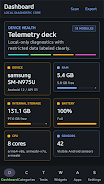
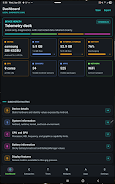
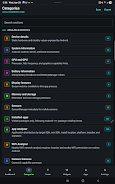
The primary dashboard provides a concise status panel with live values for processor load, RAM usage, free storage, battery health and temperatures so you can quickly assess whether a device is performing normally. Deep reports expose Android build information, kernel and ROM details, partition layouts, GPU and display parameters, and a hardware inventory that lists sensors, USB ports and supported DRM modules.
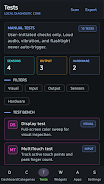
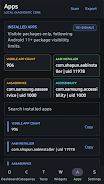
An integrated App Analyzer helps you inspect installed packages by installer source, target SDK level, install location and runtime permissions so you can audit potential risks and identify outdated or sideloaded applications. The Wi‑Fi Analyzer scans nearby networks and surfaces signal strength, channel usage, security type and an approximate distance estimate to help with local network troubleshooting. Manual hardware tests let you verify display pixels, multitouch responsiveness, flashlight operation, speaker output, vibration motor, Bluetooth connectivity and fingerprint hardware—all designed as simple, repeatable checks that you can run on demand.
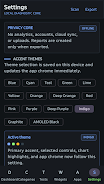
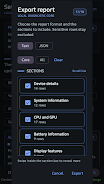
Exportable reports let you save comprehensive or selective sections in plain text or JSON formats for offline review or to attach to repair tickets. Reports and theme changes are generated only when you request them through Android Info Master, and you can tailor visual settings with high-contrast and AMOLED-friendly themes, plus configurable accent colors to improve readability during prolonged diagnostic sessions.
How it works
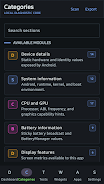
The app is organized into logical modules—Overview, Hardware, Apps, Connectivity and Tests—so progression through troubleshooting follows a natural path: start with the Overview to spot anomalies, move to Hardware for component-level checks, use Apps to vet installed software, and finish with Tests to validate repairs. Navigation relies on simple gestures and taps: swipe between main panels, expand sections with a tap, and long-press items to copy values or add them to an export. A built-in history keeps recent reports and test outcomes so you can compare before/after states over time.
Controls, Customization and Visual Style
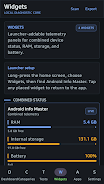
Controls are intentionally direct to reduce learning time: clear buttons trigger tests, sliders adjust display and theme parameters, and contextual menus offer quick access to exports and sharing. Android Info Master supports home screen widgets that combine device status, RAM and battery indicators for at-a-glance monitoring. Visual styling favors a high-tech, minimal aesthetic with support for dark or AMOLED-friendly themes, large-type display options and adjustable contrast so the interface remains usable under bright sunlight or in dim workshop lighting.
Accessibility, Offline Use and Replay Value
Accessibility features include scalable text sizes, high-contrast color schemes and compatibility with Android TalkBack for users who require spoken feedback. Because all diagnostics run locally, the app functions without an internet connection—use it in repair shops, fieldwork or on devices with restricted networks. Replay value comes from repeatable tests, the ability to save and compare multiple reports, and configurable test sequences that let you create checklists for routine maintenance or verification tasks.
Privacy and Data Handling
Privacy is central: the app does not require accounts, it does not collect analytics by default and it does not perform background uploads. All information remains on your device unless you explicitly export a report for sharing or backup. Permissions are requested at runtime only when a feature needs them—for example camera access to test the flashlight, location to perform Wi‑Fi scans, or phone state for certain connectivity diagnostics—so you remain in control of what the app can read or test.
Limitations and Intended Audience
Some diagnostic details require explicit permissions and certain advanced reports may be unintelligible without technical background; this product is intentionally focused on troubleshooting and verification rather than casual system browsing. There is no cloud sync or automated backup: saved reports remain local until you export them. If you prefer a very simple system info viewer, you may find the breadth of features more than you need, but technicians and enthusiasts will appreciate the depth and on-device privacy that Android Info Master offers.
- No virus
- No advertising
- User protection
Information
- File size: 23.80 M
- Language: English
- Latest Version: 1.0.2
- Requirements: Android
- Votes: 424
- Package ID: com.csware.androidinfomasterpro
- Developer: Crystal Software
Screenshots

-
1

Vlog Video Editor Maker: VlogU Mod
Download -
2

SnapTube – YouTube Downloader HD Video Mod
Download -
3

SuperVPN Fast VPN Client Mod
Download -
4

Thunder VPN – Fast, Safe VPN Mod
Download -
5

Secure VPN-Safer Internet Mod
Download -
6

ApkShare Mod
Download -
7

SOSO – Super Fast VPN Mod
Download -
8

LinkVPN Unlimited VPN Proxy Mod
Download








Explore More
The Map Navigation Software Collection features a wide range of navigation apps, addressing the issue of friends being unsure of their way when heading out. These apps provide precise navigation for users and adjust routes based on real-time traffic conditions to ensure users reach their destination quickly.

Chinese cooking recipes game

Time Sphere

Bruh Sound Button

PicklePlay

TruckTap

PIB JANDIRA

Remote Control for TV

НейроЧат