Introduction
Friendsbook brings chat, sharing and short-video features into a single social app so you can message, post photos or videos, and discover new people without juggling multiple services. The first moments after installing Friendsbook guide you through a lightweight onboarding process that sets up your profile, privacy preferences and the core navigation — messages, feed, stories and short-reels — so you can start connecting quickly.
Key features and user flow
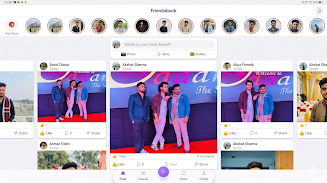
The main feed blends posts, status updates and a stories bar at the top, while a dedicated reels view surfaces bite-sized videos you can scroll through vertically. Messaging is real-time and supports one-to-one chats, group conversations and basic media sharing: send images, short clips or voice notes from the composer. Camera controls in the app let you capture photos or record short videos, apply simple filters and trim clips before posting, keeping content creation quick and focused. A persistent composer makes it easy to draft posts; drafts are saved locally so you can finish them later even if you lose network connectivity.
Controls and accessibility
Navigation relies on clear icons and gestures: a bottom bar for primary sections, swipe gestures to move between stories and a tap-and-hold option for quick reactions in chats. Text size can be increased and the interface supports a high-contrast mode to improve readability in different lighting conditions. Video captions and subtitles are supported for uploaded clips when provided by the creator, and audio controls allow muting and playback speed adjustments. Small touches such as unread indicators, typing previews and message search help manage conversations without overwhelming users.
Customization and profile progression
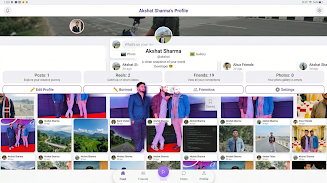
User identity and progression in the app are expressed through profile details, follower connections and content history. You can customize your bio, display image and audience settings for each post — public, followers-only or a restricted list — giving you control over who sees what. As you add content and interact with others, your profile becomes a richer expression of interests and connections rather than a formal ranking system. Saved drafts, pinned posts and a simple archive let you curate your history and revisit past moments.
Visual style and performance
The interface is intentionally clean and minimal to reduce clutter and make discovery feel organic. Photos and videos appear in a media-forward layout with consistent spacing and readable captions so you can scan content quickly. Performance is optimized for fast loading on typical mobile connections: media loads progressively and small thumbnails render first while higher-resolution images stream in, reducing wait times on slower networks. The app also includes a lightweight data-saver option to limit video autoplay and reduce cellular usage.
Discoverability and replay value
Discovery focuses on connecting you with new people and short, engaging content. A discovery panel highlights recent creators and topic tags relevant to the content you interact with, making it easier to find fresh posts without endless scrolling. Saved collections and a bookmarks area add replay value by letting you return to favorite posts and videos. Regularly updated short-video reels encourage quick creative sessions and repeated visits, while the combination of direct messaging and public posts supports both private conversations and broader interaction.
Privacy, offline use and limitations
Privacy controls are front and center, with clear audience selectors on every post and simple account settings to manage who can message you or view your content. Working offline is possible for composing posts and drafting messages; these items sync when your device reconnects. Be aware that if many of your contacts prefer other services, you may still find yourself switching apps, and some advanced niche features from specialist platforms are intentionally omitted to keep the interface straightforward.
User experience tips
To get the most from Friendsbook, invest a few minutes in the profile setup and privacy options, try posting a story or short reel to see how the camera and trimming controls behave, and use bookmarks to collect posts you want to revisit. The app is designed to reduce friction between chatting, posting and exploring while giving you practical controls over content and audience. Regular updates refine the interface and add small improvements based on user feedback, keeping the app stable and approachable for everyday social tasks.
- No virus
- No advertising
- User protection
Information
- File size: 176.63 M
- Language: English
- Latest Version: 1.0.0
- Requirements: Android
- Votes: 367
- Package ID: com.friendsbook.auth
- Developer: Akshat sharma Vats
Screenshots





-
1

BIGO LIVE – Live Streaming App Mod
Download -
2

Lovely – Meet and Date Locals Mod
Download -
3

Chat AI Assistant – Now AI Mod
Download -
4

X Mod
Download -
5

Replika: My AI Friend Mod
Download -
6

REALITY-Become an Anime Avatar Mod
Download -
7

AI Chat - Ask your AI Chatbot Mod
Download -
8

VK Calls: video calls and chat Mod
Download








Explore More
Every photo is inseparable from a good camera software to make every photo of yours beautiful. The latest and most complete camera app is waiting for you to download, and there are so many high-quality contents waiting for you to experience, you will definitely not be able to put it down.
View more