Introduction
Neo Clean is a lightweight utility that helps you reclaim storage and tidy up your Android device by identifying and removing junk files, caches and unused APKs. With Neo Clean you can perform quick scans for large files, review screenshots and duplicates, and inspect battery usage details to make informed cleanup choices. The app keeps a focused feature set so that clearing space is straightforward and safe — you always review items before deletion and control what stays or goes.
What Neo Clean does
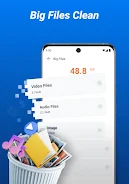
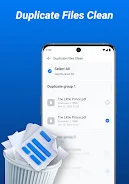
Neo Clean scans common sources of wasted space: temporary system files, residual files left by uninstalled apps, ad caches, log files and leftover APK installers. It also looks for large media files and duplicate items that silently occupy gigabytes. Scans produce a categorized list so you can see where storage is used, with file previews and metadata such as size, location and last modified date to help you decide what to remove.
How scanning and cleanup work
The app offers a quick scan mode that targets files over a practical threshold and a more comprehensive scan that examines caches and app leftovers. When a scan finishes, results are grouped by type and sorted by size so the biggest space gains are obvious. Each candidate item can be opened or previewed before removal, and you choose individual files or entire groups to delete. This review step minimizes accidental removals and gives you confidence while freeing substantial space.
Controls and user interface
Neo Clean uses a simple, touch-friendly interface designed for fast operation on phones and tablets. Core actions are performed with taps: start a scan, open a preview, select items, and confirm deletion. Results screens let you sort and filter by size, date or type, and thumbnails are shown for images while file paths are displayed for clarity. The layout emphasizes readability and minimizes unnecessary options so common tasks complete in a few interactions.
Customization and scan options
You can tailor scans to your needs by adjusting basic filters and exclusions. Choose a minimum file size to focus on unusually large files, include or exclude screenshot folders, and limit scans to particular storage locations. These controls let you balance thoroughness and speed: a narrower scan runs quickly, while a broader check can uncover less obvious sources of waste. Settings are intentionally transparent to keep the app lightweight and predictable.
Progress indicators, history and recovery
During scans and cleanup, Neo Clean displays clear progress indicators and estimated time remaining so you know when tasks will complete. After cleanup operations the app shows a summary of reclaimed storage and which categories contributed most. Reviewable logs allow you to confirm past actions and double-check what was removed, helping you learn which types of files commonly build up on your device.
Visual style and accessibility
The visual design is clean and utilitarian: high-contrast text, large touch targets and clear icons help users of all experience levels. Text sizes and spacing are chosen for readability on smaller screens, and the simple structure supports accessibility tools such as screen readers. Neo Clean aims to make maintenance approachable for users who want an uncluttered interface without a steep learning curve.
Performance, privacy and offline use
Neo Clean is designed to be lightweight and efficient so scans complete quickly and without heavy battery drain. All scanning and file operations happen locally on the device; the app does not require an online connection to identify and remove files. To perform full scans, it will request the necessary storage and media permissions and explains why each permission is needed. No personal data is uploaded or shared as part of the cleanup process.
Practical tips and limitations
For routine maintenance, run quick scans to target files over the size threshold and occasionally perform a deeper scan to catch accumulated cache and leftover APKs. Remember that Neo Clean focuses on basic cleanup tasks rather than advanced system tuning: it does not modify system settings or perform low-level optimizations. The app is best used as a straightforward tool to recover space, organize files and keep your media library tidy.
Why users choose Neo Clean
Users appreciate Neo Clean for its simplicity, transparent controls and efficient scanning that prioritizes large, easy-to-remove files. It helps keep devices responsive by freeing storage and reducing clutter while leaving important files intact through a careful preview-and-confirm workflow. If you want a no-frills cleaner that works offline, explains permissions clearly, and keeps the user in control of deletions, Neo Clean is a practical choice.
- No virus
- No advertising
- User protection
Information
- File size: 32.78 M
- Language: English
- Latest Version: 3.0.0
- Requirements: Android
- Votes: 110
- Package ID: com.cleanup.neo.clean.files.junk.cleaner
- Developer: X LAB
Screenshots


-
1

Vlog Video Editor Maker: VlogU Mod
Download -
2

SnapTube – YouTube Downloader HD Video Mod
Download -
3

SuperVPN Fast VPN Client Mod
Download -
4

Thunder VPN – Fast, Safe VPN Mod
Download -
5

Secure VPN-Safer Internet Mod
Download -
6

ApkShare Mod
Download -
7

SOSO – Super Fast VPN Mod
Download -
8

LinkVPN Unlimited VPN Proxy Mod
Download








Explore More
We provide a wide range of commonly used software for free and secure download. All software has undergone thorough security and virus scans to ensure a safe download experience.

Real Beauty Loyalty

Chinese cooking recipes game

Drift

Tierbuch Hühner
CookingTimerPro

FinSwift

LibLib

Soonly: Ideas & Notes