Introduction
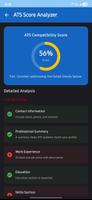
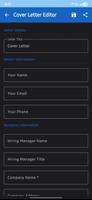
My Resume Maker is a compact resume and CV-building tool designed to help job seekers, students and professionals produce clean, interview-ready documents quickly. My Resume Maker guides you through each section of a resume—personal details, experience, education and skills—so you can focus on the content rather than layout. The app includes a range of modern templates that are optimized for Applicant Tracking Systems, a cover letter generator, and simple export options so your finished CV looks professional when viewed by recruiters or hiring managers.
Key features and workflow
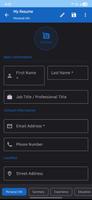
The guided workflow in My Resume Maker breaks the resume creation process into manageable steps: add contact details, list relevant roles and accomplishments, describe education, and highlight skills and certifications. Each step prompts for concise, action-oriented phrasing and shows examples you can adapt. Editing is done through straightforward touch controls: tap to edit a field, choose from suggested formats for dates and job titles, and use on-screen controls to reorder sections or hide items that aren’t relevant to a particular application. The step-by-step approach helps you progress from a basic draft to a polished document while keeping versioning simple and transparent.
Templates, visual style and customization
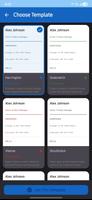
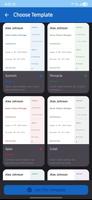
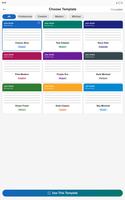
My Resume Maker offers dozens of templates that range from conservative, ATS-friendly designs to more modern, visually distinct layouts suitable for creative or tech roles. Templates control spacing, headings, font hierarchy and the density of information so recruiters can scan your CV quickly. Within each template you can customize fonts, sizes, accent colors and section headings to match the tone of the role you are applying for, and save template presets to reuse later. This level of customization keeps the visual style consistent between your resume and matching cover letter without demanding design skills.
Controls, progression and profile management
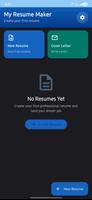
The app’s control model is intentionally simple: add entries, set dates and responsibilities, and mark skills by proficiency or relevance. Progression is managed by saving draft versions as you edit, duplicating profiles to tailor resumes for different roles, and archiving older CVs for comparison. Multiple profiles let you maintain distinct resumes for different career paths—such as internships, technical roles or management positions—so you can quickly export the version best suited for a new application. This system supports iterative refinement: start with a base profile, make role-specific edits, then export or share the result.
Export options, offline use and file handling
Exporting is focused on high-quality PDF output to ensure consistent presentation when your resume is opened on another device or sent to a recruiter. The app produces printable PDFs that preserve layout, fonts and spacing, and includes options for matching cover letters and file naming conventions that reflect the job title or company. Offline editing is supported so you can create or revise CVs without a network connection; changes are saved locally and remain available for export when connectivity returns. If you prefer to keep backups outside the device, exporting PDFs and saving them to your chosen cloud or file manager is a dependable workflow.
Accessibility, readability and usability
Attention to readability guides many design choices in My Resume Maker: templates prioritize clear typographic hierarchy, sufficient contrast and legible font sizes so information scans easily on mobile screens and printed pages. The step-based editor reduces cognitive load by focusing on one section at a time, and inline hints explain common resume conventions like how to list accomplishments and quantify results. These touches improve accessibility for users who are new to resume writing or who need a straightforward, distraction-free interface.
Replay value, reuse and practical tips
The app’s replay value comes from its ability to generate multiple tailored CVs quickly: save different templates and profiles, update role-specific keywords to pass ATS filters, and iterate on phrasing to emphasize measurable achievements. Practical tips and examples embedded in the editor help you refine bullet points and select relevant skills, which makes each new version more effective for a given vacancy. Because the core tools are offline-capable and template-driven, the app remains useful over time as you accumulate experience and create updated resumes for career changes.
Limitations and considerations
There are a few limitations to be aware of: export choices focus primarily on PDF, so users who need editable Word or other file types may need to convert files externally. The emphasis on ATS-friendly, professional templates means the app may not offer highly experimental or unconventional layouts sought by some creative portfolios. The description does not guarantee automatic cloud syncing or real-time collaboration, so users who require multi-device sync or joint editing should use manual export workflows or their own cloud tools. Overall, My Resume Maker is intended as a practical, offline-capable tool for creating clear, well-formatted resumes and matching cover letters with minimal fuss.
- No virus
- No advertising
- User protection
Information
- File size: 24.97 M
- Language: English
- Latest Version: 1.3
- Requirements: Android
- Votes: 480
- Package ID: com.resumeforge.app
- Developer: Samuel Paul
Screenshots
-
1

Vlog Video Editor Maker: VlogU Mod
Download -
2

SnapTube – YouTube Downloader HD Video Mod
Download -
3

SuperVPN Fast VPN Client Mod
Download -
4

Thunder VPN – Fast, Safe VPN Mod
Download -
5

Secure VPN-Safer Internet Mod
Download -
6

ApkShare Mod
Download -
7

SOSO – Super Fast VPN Mod
Download -
8

LinkVPN Unlimited VPN Proxy Mod
Download








Explore More
Discover and download the latest system software of 2024 at high speed for free. Explore multidimensional rankings and references to help you choose the best system software. Rest assured, all software has undergone rigorous security checks and virus scans for your safety.
View more