Introduction
PDFEssence is a straightforward mobile utility that converts photos and images into multi-page PDF documents with a focus on speed and simplicity. The app places the core tools where you need them: pick images from your gallery or capture new photos, make quick adjustments, arrange pages, and export a single, shareable PDF. PDFEssence keeps the interface uncluttered so you can complete a conversion in just a few taps, whether you are preparing receipts, notes, or image collections for archiving.
How it works
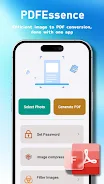
The conversion workflow in PDFEssence follows a clear, linear progression that makes the process predictable and easy to learn. Start by selecting one or more images from your device or by taking a new picture with the camera. Next, move through an edit stage where you can crop, rotate, and reorder pages. Finally, choose export settings and save or share the finished PDF. This step-by-step flow reduces friction for occasional users while supporting faster batch work for frequent tasks.
Controls and editing
Controls are designed for touch: tap to select, pinch to zoom when cropping an image, and press-and-drag to reorder pages in the document preview. Basic editing tools let you crop to a selected area, rotate images to the correct orientation, and trim or remove unwanted pages. These limited but practical controls keep the learning curve shallow and let you focus on getting the document right rather than navigating complex menus.
Output options and customization
When exporting, you can adjust simple output options to match your needs. Choose orientation and a target image quality to balance file size and visual fidelity, and pick a filename before saving. PDFEssence aims to produce clean, printable PDFs suitable for sharing by email, storing in cloud services, or archiving on local storage. The app preserves page order and image clarity while keeping the file footprint reasonable for everyday use.
Visual style and user experience
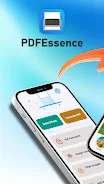
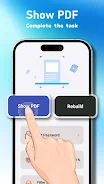
The app’s visual style prioritizes legibility: high-contrast buttons, clear labels, and a single-column workflow that minimizes distractions. Visual previews show a realistic page-by-page representation of the final PDF so you can verify order and cropping before export. Small touches like undo during the edit stage and visible progress indicators during conversion help make the experience feel reliable and predictable.
Organization and reuse
To speed repeated tasks, PDFEssence remembers recent export settings and preserves the last-used output quality and orientation. This lightweight persistence reduces repetitive setup for users who regularly create similar documents. The app also supports quick renaming of the generated file and easy access to the folder where files are saved so you can continue working with other apps or backup services without extra steps.
Accessibility and offline use
PDFEssence is designed to be usable without a network connection: all conversion work is performed on the device so you can create PDFs while offline. The interface emphasizes large touch targets and simple language to improve accessibility, and controls are organized to be discoverable for users relying on larger text or screen magnification. Because it does not depend on cloud processing, document creation remains private and immediate.
Practical tips and limitations
For the best results, use well-lit images with steady framing and minimal background clutter; cropping and rotation are available to correct common issues. PDFEssence intentionally focuses on image-to-PDF conversion and basic edits, so it does not include advanced annotation, OCR, or multi-format conversion tools. If you need complex document editing or searchable text extraction, those functions are outside the scope of this app.
Why it might fit your workflow
PDFEssence is appropriate for users who want a fast, low-friction way to turn photos into portable documents without learning a complex editor. The app balances essential editing, practical export controls, and an uncluttered UI to streamline everyday tasks like digitizing receipts, saving whiteboard photos, or combining pages for easy sharing. By keeping features focused and reliable, PDFEssence helps you produce usable PDFs with minimal setup and predictable results.
- No virus
- No advertising
- User protection
Information
- File size: 84.49 M
- Language: English
- Latest Version: 1.0.1
- Requirements: Android
- Votes: 145
- Package ID: com.names.guidesa.pdfessencesq
- Developer: RolledTunaRice
Screenshots


-
1

Vlog Video Editor Maker: VlogU Mod
Download -
2

SnapTube – YouTube Downloader HD Video Mod
Download -
3

SuperVPN Fast VPN Client Mod
Download -
4

Thunder VPN – Fast, Safe VPN Mod
Download -
5

Secure VPN-Safer Internet Mod
Download -
6

ApkShare Mod
Download -
7

SOSO – Super Fast VPN Mod
Download -
8

LinkVPN Unlimited VPN Proxy Mod
Download








Explore More
We provide a wide range of commonly used software for free and secure download. All software has undergone thorough security and virus scans to ensure a safe download experience.

Real Beauty Loyalty

Chinese cooking recipes game

Drift

Tierbuch Hühner

CookingTimerPro

FinSwift

LibLib

Soonly: Ideas & Notes