
Introduction
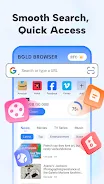
Bold Browser is a compact, feature-packed Android browser designed to combine fast, secure web browsing with straightforward tools for downloading and managing media. Bold Browser opens multiple tabs without clutter, lets you pin favorite sites to a customizable homepage for one-tap access, and keeps bookmarks and history organized so you can find frequently visited pages quickly. The app offers a private (incognito) mode that prevents local storage of searches, cookies and cache, plus an integrated video downloader and player so saved clips are available for offline viewing. Built-in file management for photos, videos and audio, together with news feeds, a QR scanner and switchable search engines, make this browser a useful all-in-one tool on mobile devices.
Key features and everyday use
Multiple tabs are simple to create and manage: open links in new tabs, move between pages with quick taps, and close tabs when you’re done. The pin-to-homepage option turns a frequently used site into a one-touch shortcut so common tasks — checking a news site, an online shop, or a web app — become faster. Bookmarks and browsing history are arranged to help you build a personal library of important pages over time, and the search bar supports swapping search providers to match your preferred results.
Media download and offline playback
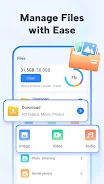
Bold Browser’s built-in video downloader identifies downloadable media on pages and lets you save clips directly to the device where they can be watched in the integrated player. Saved media is available offline, which is convenient for travel or when you expect limited connectivity. The included basic file manager helps you browse and organize saved photos, video files and audio without switching to a separate file app, keeping downloaded content accessible in one place.
Controls, navigation and user experience
The interface is intentionally uncluttered so navigation feels responsive on phones and small tablets: a toolbar provides quick access to search, the QR scanner and the downloader, while common tab and bookmark actions are reachable with simple taps. The homepage layout is customizable; you can pin sites and arrange quick links to match how you browse. Settings offer straightforward options to clear local data, manage downloads and choose a default search engine, keeping control in your hands without an overload of technical jargon.
Privacy, limitations and realistic expectations
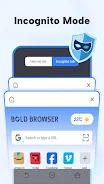
Privacy-conscious users will find a useful private browsing mode in Bold Browser that prevents local storage of browsing data on the device. The app description does not claim advanced tracker blocking or enterprise-grade privacy protections, and some websites may actively prevent direct video downloads, so not every media file will be retrievable. The description also omits certain technical specifics such as exact Android version compatibility or permission details; check the app listing or installation prompts for current system requirements and requested permissions.
Customization, progression and long‑term value
Over time you can shape the browser to your habits: pin frequently visited pages, maintain curated bookmarks, and use the downloader to build an offline media collection. These small actions create a personalized browsing environment that improves productivity and convenience, with the browser adapting to how you surf rather than forcing a rigid workflow. The compact design makes it well suited for users who want a capable browser plus basic media tools without installing multiple apps.
Accessibility, compatibility and support
Bold Browser emphasizes clear icons and readable layouts to help users of varied skill levels access features quickly; common actions like opening a tab, saving a video, or scanning a QR code are designed to be discoverable and simple. Offline playback of downloaded videos extends usability when network access is limited. For questions, bug reports or feedback you can reach support by email at the address provided in the app details: [email protected]. Expect routine updates to address stability and compatibility as the app evolves.
- No virus
- No advertising
- User protection
Information
- File size: 94.70 M
- Language: English
- Latest Version: 2.8.0.0
- Requirements: Android
- Votes: 425
- Package ID: com.ltcom.bold.pro
- Developer: the2guys
Screenshots


-
1

Vlog Video Editor Maker: VlogU Mod
Download -
2

SnapTube – YouTube Downloader HD Video Mod
Download -
3

SuperVPN Fast VPN Client Mod
Download -
4

Thunder VPN – Fast, Safe VPN Mod
Download -
5

Secure VPN-Safer Internet Mod
Download -
6

ApkShare Mod
Download -
7

SOSO – Super Fast VPN Mod
Download -
8

LinkVPN Unlimited VPN Proxy Mod
Download








Explore More
Explore the Latest Free Downloads of Top Photo Apps in 2024, Featuring Multi-Dimensional App Rankings and Recommendations for the Best Photo Applications. All apps are virus-free, safe and secure for your peace of mind.

Chennai Super Kings

Fruits and Vegetables for Kids

TriviaMaker

HTC Net

Prophecology

PearDrop

Cultura y Turismo Qro

Remote Control for TV

























