Introduction
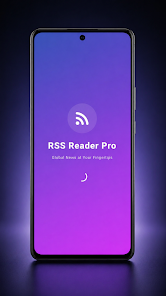
RSS Reader is a lightweight app that helps you follow any RSS feed by adding a feed URL and presenting articles in a clean, fast interface. The app focuses on distraction-free reading: feeds are organized into a tidy list, article pages show full details and images where available, and it is simple to open stories in your browser or share them with a tap. Built for speed and low memory use, RSS Reader is a straightforward utility for catching up on news, blogs, and other feed-driven content without extra clutter or steep learning curves.
Key features
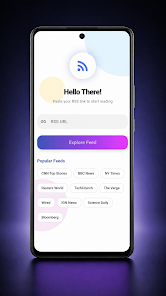
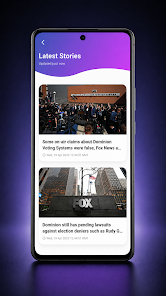
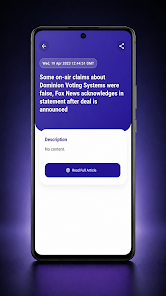
The core of the experience is simplicity. Add any RSS feed URL and the app will fetch recent items so you can scan headlines quickly, open full articles with images for richer context, and use built-in sharing to send links to other apps. A "load more" behavior lets you browse older items on demand rather than preloading everything, which keeps performance responsive on modest devices. Article views are focused on readability, with images presented inline when available and a single-tap option to open the original article in your browser. Background fetch is intentionally conservative to preserve battery life while keeping the most recent items ready when you launch the app.
Navigation and controls
Navigation is intentionally straightforward to reduce friction: tap a feed entry to expand and read, use clear back controls to return to the list, and open stories in the browser when you want the full site experience. The interface supports smooth vertical scrolling and quick article loading so you can move through many items without delay. Controls for sharing and opening articles are placed prominently on the article view so common actions are fast and predictable, and simple visual cues indicate which items are new or unread.
Reading flow and progression
RSS Reader is designed around a linear reading progression that suits daily catch-up sessions. Unread indicators make it easy to pick up where you left off, and the app keeps recently viewed articles accessible so you can return to items later. The ability to load older posts on demand creates a natural progression through a feed without overwhelming the device with background downloads. For regular readers, this creates a comfortable rhythm: scan headlines, open items that interest you, and move through the list while the app keeps track of what you have seen.
Visual style and customization
Visual design is modern and minimal to keep attention on the content. While RSS Reader does not aim to be a highly configurable power tool, it provides basic display options to improve comfort: choose a light or dark color scheme and adjust text size to suit your reading preference. These modest customization settings help make the reading experience more accessible without adding complexity to the setup process. Typography choices and spacing prioritize legibility, and images within article views scale appropriately to preserve layout clarity on phones and tablets.
Offline use and accessibility
To support reading on the go, the app caches recently loaded articles so you can access them without an active connection for a limited time. This caching is intended for short-term offline reading and to reduce repeated network requests for items you have already opened. Accessibility considerations include adjustable font sizing and clear contrast in the UI so that the app remains usable for readers with different visual needs. The compact design also helps users on slower connections or with limited data plans.
Limitations and target users
RSS Reader prioritizes speed and simplicity, so it intentionally lacks advanced feed management or extensive customization that power users sometimes want. There is no built-in cloud sync for account-based feed state across multiple devices, and shared or collaborative features are not part of the core design. If you prefer a no-frills, privacy-friendly way to follow a handful of feeds with fast performance and an uncluttered article view, RSS Reader is a solid choice. For users who need sophisticated organization, tagging, or multi-device syncing, a more feature-rich feed manager may be preferable.
Why it fits daily reading habits
Overall, RSS Reader offers a focused reading tool for anyone who wants to keep up with news and blogs without distractions. Its streamlined controls, readable article views, and lightweight approach make it well suited to short daily sessions and longer catch-up periods alike. With conservative background fetching and simple display options, the app balances convenience with performance so that reading feeds becomes a quick, predictable part of your routine.
- No virus
- No advertising
- User protection
Information
- File size: 19.00 M
- Language: English
- Latest Version: 1.0.0
- Requirements: Android
- Votes: 385
- Package ID: com.rssreader.pro
- Developer: QuvloxStudio
Screenshots
-
1

Vlog Video Editor Maker: VlogU Mod
Download -
2

SnapTube – YouTube Downloader HD Video Mod
Download -
3

SuperVPN Fast VPN Client Mod
Download -
4

Thunder VPN – Fast, Safe VPN Mod
Download -
5

Secure VPN-Safer Internet Mod
Download -
6

ApkShare Mod
Download -
7

SOSO – Super Fast VPN Mod
Download -
8

LinkVPN Unlimited VPN Proxy Mod
Download








Explore More
You'll Love the Complete Collection of Everyday Life Apps! Today's compilation is essential for your daily life, offering a plethora of excitement. Don't wait any longer—pick and choose the apps you need right away!
View more